Media Formats Explained: Audio, Video and Image Formats for Creators
A plain guide to media formats: common audio, video and image file types, what each is best for, and how to choose formats for podcasts and social video.
“Media format” means two different things, and both matter when you create content:
- A file format: how audio, video, or images are stored, such as MP3, MP4, or PNG.
- A content format: the shape of the content itself, such as a podcast, newsletter, vlog, or short-form clip.
This guide covers both. First, the common file formats and when to use each one. Then, how to pick the right content format for you.
What is a media file format?
A media file format tells software how a piece of audio, video, or image data is stored. Two ideas explain most of the differences between formats:
- Compression. Lossless formats keep every bit of the original. Lossy formats throw away detail people are unlikely to notice, which makes files much smaller. Uncompressed formats store the raw data and are the largest.
- Container vs. codec. For video especially, the file extension (like .mp4 or .mov) is the container. The codec (like H.264, HEVC, or AAC) is how the audio and video inside are actually compressed. Two .mp4 files can use different codecs, which is why one may play everywhere and another may not.
As a rule: record and edit in high quality, then export in a compressed, widely supported format for publishing.
Common media formats at a glance
| Format | Type | Best for |
|---|---|---|
| WAV | Audio (uncompressed) | Recording and editing; master files |
| AIFF | Audio (uncompressed) | Recording and editing on Apple software |
| FLAC | Audio (lossless) | Archiving audio at full quality in smaller files |
| MP3 | Audio (lossy) | Podcast publishing; sharing audio anywhere |
| AAC / M4A | Audio (lossy) | Apple devices, iPhone recordings, audio in MP4 video |
| OGG / Opus | Audio (lossy) | Web and voice apps; efficient streaming |
| MP4 | Video container | Uploading to social platforms and YouTube; sharing |
| MOV | Video container | Apple devices and editing in Apple software |
| WebM | Video container | Video on websites |
| MKV | Video container | Archiving or storing many audio and subtitle tracks |
| AVI | Video container | Older Windows workflows; rarely needed today |
| JPEG | Image (lossy) | Photos and thumbnails |
| PNG | Image (lossless) | Logos, graphics, screenshots, images with transparency |
| WebP | Image (lossy or lossless) | Images on websites |
| HEIC | Image (lossy) | Photos taken on iPhone |
| GIF | Image (animated) | Short, simple animations and reactions |
| SVG | Image (vector) | Logos and icons that need to scale |
| SRT / VTT | Caption text | Subtitles and closed captions for video |
Audio formats
WAV and AIFF store audio without compression. They are the best choice while you record and edit, because every edit and export starts from full quality. They are also large, so they are not ideal for publishing.
FLAC is lossless but compressed, so it keeps full quality in a smaller file. It is useful for archiving masters.
MP3 is the most widely supported audio format. Almost every podcast host, app, and device plays it, which makes it the safe choice for publishing podcast episodes.
AAC and M4A are common on Apple devices. M4A is the file type Voice Memos uses on iPhone, and AAC is also the usual audio codec inside MP4 videos. If you recorded on an iPhone, see our guide to recording audio on iPhone.
OGG and Opus are efficient lossy formats used by many web and voice apps.
Video formats
MP4 is the default for sharing video. It is accepted by social platforms, YouTube, and nearly every device. When in doubt, export MP4 with H.264 video and AAC audio, the most widely compatible combination.
MOV is Apple’s container. iPhones and Macs often record or export MOV files, and they usually upload fine. If a platform or tool rejects one, convert it to MP4.
WebM is designed for video on the web and is often used for video embedded on websites.
MKV can hold many audio and subtitle tracks, which makes it useful for archiving, but some platforms and editors do not accept it.
AVI is an older Windows format. You will rarely need it today.
Newer iPhones often record video in HEVC (H.265), which keeps quality high in smaller files. Some older software has trouble with HEVC, so convert to H.264 if a file will not open or upload.
Image formats
JPEG is best for photos and video thumbnails. PNG is best for logos, graphics with text, screenshots, and anything that needs a transparent background, such as a logo overlay on a video. WebP gives smaller images for websites. HEIC is the default photo format on iPhone; convert to JPEG if a tool does not accept it. SVG is a vector format for logos and icons that need to stay sharp at any size. GIF works for short, simple animations, though a short MP4 is usually smaller and looks better.
How to choose formats for podcasts
- Record in WAV (or the highest quality your recorder offers). If you record remotely, keep each speaker’s track separate when your software allows it.
- Edit from the high-quality files, not from compressed copies.
- Publish the final episode as MP3, using the settings your podcast host recommends.
- Keep a master as WAV or FLAC so you can re-export later without losing quality.
- Video podcasts: record in the best quality your camera or software allows, then publish as MP4.
- Transcripts and captions: export transcripts as text and captions as SRT or VTT. The podcast transcript generator and podcast subtitle generator can create both from your audio.
How to choose formats for social video
For short-form clips on TikTok, Reels, Shorts, LinkedIn, and X, the file format matters less than the shape and the captions:
- Export MP4 (H.264 video, AAC audio). It is accepted almost everywhere.
- Match the aspect ratio to the platform. Use 9:16 for Reels, Shorts, and TikTok, 1:1 or 4:5 for feed posts, and 16:9 for YouTube and websites. See our YouTube Shorts dimensions guide.
- Burn in captions for clips that autoplay on mute, or upload an SRT file where the platform supports it. Learn the difference in open vs. closed captions.
- Use PNG for logos and overlays, and JPEG for thumbnails.
- Turn audio-only content into video. Platforms expect video, so an MP3 clip needs visuals. Create a waveform video with the audio waveform generator or a full episode video with podcast to video.
Recast exports clips as MP4 in 9:16, 1:1, and 16:9 from the same project, so you do not need to convert or resize for each platform.
Choosing a content format: find your “creator-format fit”
The other meaning of media format is the type of content you make: a podcast, newsletter, vlog, essay, thread, or meme. Picking one format and sticking with it has real advantages:
- The format’s limits keep you focused.
- You get better at one medium faster.
- You spend your time on your message instead of learning new tools.
- You can judge whether the format works and move on in a more predictable way.
I call the right match the “creator-format fit”. Here is the simple framework I use when starting a new project.
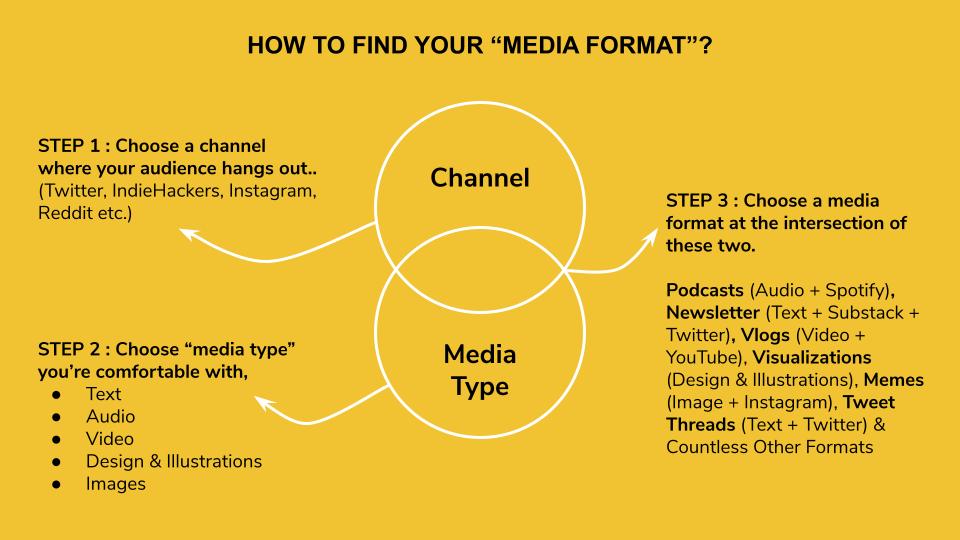
Step 1: Choose a channel where your audience spends time. For example, YouTube, LinkedIn, Instagram, Reddit, or a newsletter platform.
Step 2: Choose the media type you are comfortable with. Text, audio, video, design and illustration, images, or a mix.
Step 3: Choose a format where the two meet. For example:
- Podcast (audio + podcast apps)
- Newsletter (text + email)
- Vlog (video + YouTube)
- Short-form clips (video + TikTok, Reels, Shorts)
- Memes (image + Instagram)
- Threads (text + X or LinkedIn)
- Comics (illustration + text + a social platform)
Then go one level deeper. If you choose podcasts, ask yourself: are you comfortable in conversation? Do interviews. Do you prefer talking through a topic on your own? Record solo episodes.
Once one format works, you do not have to start from scratch for the next. A single podcast episode can become clips, audiograms, show notes, and a blog post. Read our guide to repurposing your podcast content, or see how Recast Studio turns one recording into content for every channel.