How to Make Gary Vee Style Video
Learn the parts of a Gary Vee style video, from captions and title bars to progress bars and branding, and how to recreate the format in a few minutes.
Gary Vaynerchuk, better known as Gary Vee, is an entrepreneur and the founder of the digital agency VaynerMedia. He is also known for posting a huge amount of content. A big part of how he does that is a simple, recognizable video style: short clips cut from longer talks and interviews, with a bold title at the top and large captions at the bottom.
The style is often called a “video meme” or “letterhead” format. It is easy to recognize and easy to produce, which is why so many creators, coaches, and podcasters use it. This guide breaks down each part of a Gary Vee style video, explains why it works, and shows how you can recreate it in a few minutes.
Why the Gary Vee Video Style Works
- It works without sound. Many people scroll social feeds on mute. Large captions let them follow along anyway.
- The title gives instant context. Viewers know what the clip is about before they decide to watch.
- It fits every feed. Square and vertical versions work on Instagram, TikTok, YouTube Shorts, LinkedIn, Facebook, and X.
- It scales. One long recording can become dozens of clips, which is how Gary Vee publishes so much content.
- It builds recognition. When every clip uses the same layout, people recognize your content before they read your name.
The Components of a Gary Vee Style Video
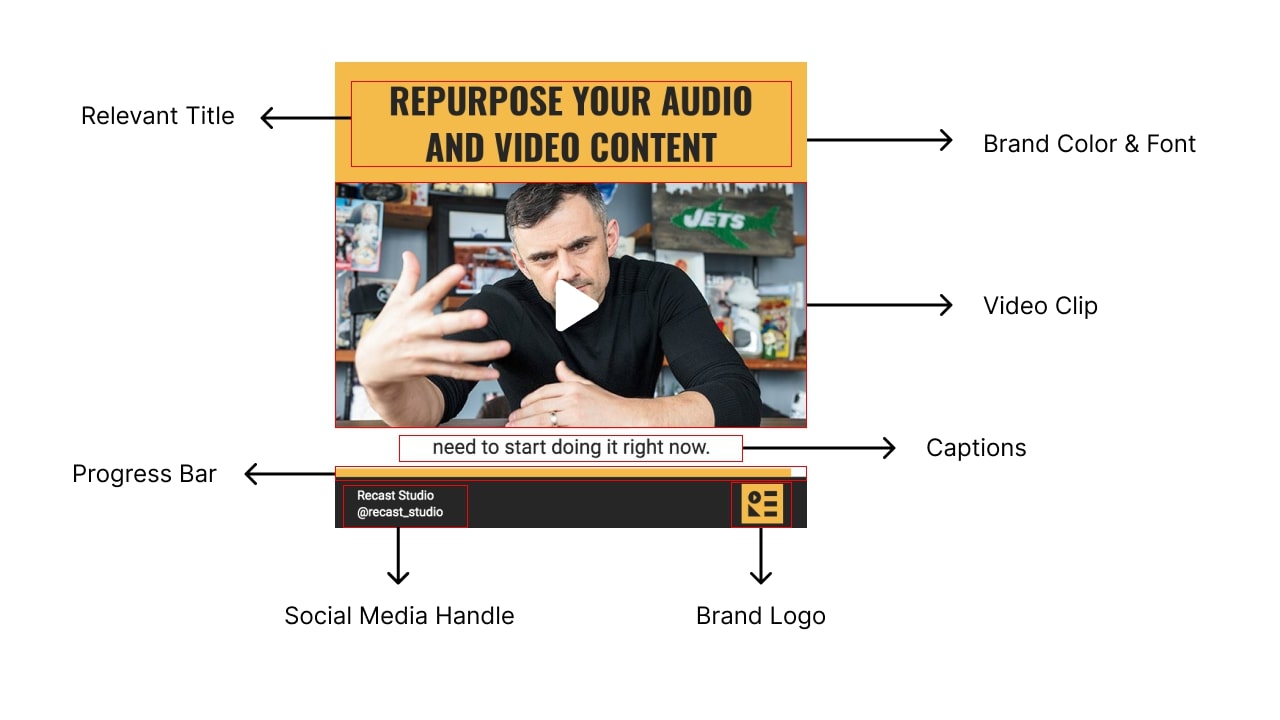
The Video Clip
The center of the frame is the clip itself. Take a strong highlight from a longer video, podcast, keynote, or interview, or simply record a short selfie video. Choose a moment that makes one clear point and makes sense without the rest of the conversation. Most clips in this style run from 15 seconds to about a minute.
The Title
A title bar sits above the video. It should be short, specific, and catchy, and it should tell viewers what they will get: “Stop waiting for the perfect time to start” works better than “Clip from episode 42.” Think of it as the headline for the clip.
Captions (Subtitles)
Captions are the most important part of the format. You have only a few seconds to catch someone’s attention, and captions keep people watching even when the sound is off.
Use open captions (also called burned-in captions), which are part of the video image. Unlike closed captions, you can style them to match your brand and animate them, for example by highlighting each word as it is spoken. Read more about the difference in open vs. closed captions, or see how to add open captions to your video.
Progress Bar
A thin progress bar shows how much of the video is left. It tells viewers that the clip is short and encourages them to watch until the end, which helps on platforms like Instagram and X.
Consistent Brand Identity
Use the same colors, fonts, logo, and layout on every video. When your audience sees the same theme again and again, they recognize your content instantly while scrolling.
Tips for Better Gary Vee Style Videos
- Lead with the strongest line. Cut any introduction and start the clip where the point begins.
- Keep one idea per clip. If a section makes two points, make two clips.
- Check your captions. Automatic captions are fast, but fix names, numbers, and specialist terms before you publish.
- Make several sizes. Create a square version for feeds and a 9:16 vertical version for Reels, Shorts, and TikTok.
- Post consistently. The format works best as a steady stream of clips, not a single post.
How To Make a Gary Vee Style Video With Recast Studio
Create a free account on Recast Studio and start a new project. Then follow these steps.
Step 1: Upload Your Video
Upload a video or podcast episode. Recast automatically transcribes it and finds the most engaging highlights to turn into short clips. You can also create clips manually by selecting text in the transcript. The Podcast Clip Maker and YouTube Clip Maker both work this way.
Step 2: Choose a Template
Recast Studio offers Gary Vee style templates with a title bar, caption area, and progress bar already in place. Every template is customizable, so you can change the font, colors, text, and images.
Step 3: Customize Your Video
Use the editor to stay on brand. Edit the title, adjust the caption style, change colors and fonts, add your logo, and correct any words in the subtitles. For audio-only content, you can add a waveform animation instead of a video clip, which turns the clip into an audiogram.
Step 4: Download and Share
Preview the video and click Download to render it. You will get an MP4 file in a few minutes. Post it on social media, then resize it in Recast Studio to create versions for other platforms.
Conclusion
The Gary Vee video style is popular because it is simple: a strong clip, a clear title, readable captions, a progress bar, and consistent branding. You do not need a large team to use it. With a long recording and a tool like Recast Studio, you can turn one conversation into a week of social posts. For more formats like this one, see our list of evergreen video ideas.