How to Create a NotebookLM Podcast and Repurpose It into Social Content
Learn how to create a NotebookLM podcast, download the audio overview, and turn it into clips, captions, and shareable videos with a repeatable workflow.
Have you ever wished you could turn your research notes or articles into an engaging podcast? Thanks to Google’s NotebookLM, that’s not only possible — it’s remarkably easy. NotebookLM’s Audio Overview feature transforms your uploaded documents into podcast-style discussions, complete with summaries, topic connections, and natural banter.
Since its initial launch, the Audio Overview feature has evolved significantly. It now supports 80+ languages, offers multiple audio formats (Deep Dive, Brief, Critique, and Debate), lets you join the conversation interactively in English, and sits inside a much broader Studio panel that can also generate Video Overviews, slide decks, reports, infographics, data tables, and other research assets. In this guide, we’ll walk you through the entire process — from uploading your first document to repurposing the generated audio into social-ready video content.

What is NotebookLM?
NotebookLM is Google’s AI-powered research and document analysis tool. Google now refers to parts of the product and help center as Gemini Notebook, but most users still know it as NotebookLM. Think of it as your personal research assistant that can read, understand, and discuss the sources you add to a notebook.
In its latest research upgrades, Google says NotebookLM runs on Gemini 3.5 and Antigravity for stronger reasoning, can use a secure cloud computer for code-backed analysis, and can help discover relevant web sources that you choose to add to your notebook.
Here’s what makes it stand out:
- Broad Source Support: Upload PDFs, DOCX files, .txt files, Markdown, CSVs, PowerPoint files, ePub files, Google Docs, Google Slides, Google Sheets, images, web URLs, public YouTube videos with captions, Gemini chats, and audio files. Free users can add up to 50 sources per notebook, with higher source limits on paid Google AI plans.
- Intelligent Analysis: NotebookLM becomes an instant expert on your uploaded content. It can answer questions, provide summaries, generate study guides, create mind maps, and build research outputs from your sources.
- Conversational Interface: Have a natural conversation with the AI about your documents. Ask follow-up questions, request clarifications, or explore specific angles.
- Citation Support: Every AI-generated response includes inline citations linked back to your original sources, making fact-checking straightforward.
- Privacy-Focused: Your uploaded data is never used to train the AI models, keeping your research and ideas private.
- Multiple Output Formats: Beyond text responses, NotebookLM can generate Audio Overviews, Video Overviews, flashcards, quizzes, mind maps, reports, infographics, slide decks, data tables, and downloadable files such as PDFs, DOCX, Markdown, CSV, JSON, XLSX, and PowerPoint files.
- Cross-Platform Access: NotebookLM is available in the browser and through dedicated mobile apps on iOS and Android, with offline Audio Overview support.
Want to convert web URLs, PDFs, and text into engaging audio conversations with custom voices and full control over script generation? 🔥 Try Jalp AI
Understanding the Audio Overview Feature
Audio Overview is NotebookLM’s signature feature that turns your documents into podcast-style audio discussions. Since its debut, it has grown from a simple English-only experiment into a powerful, multilingual, interactive audio engine.
👉 Convert NotebookLM audio to video
What it does
Audio Overview takes the documents you’ve uploaded to NotebookLM and transforms them into a dynamic discussion between two AI hosts. These hosts summarize your material, draw connections between different topics, highlight key insights, and engage in natural-sounding conversation to keep things engaging.
Audio Overview Formats
As of September 2025, NotebookLM offers four distinct audio formats. You can select the format by clicking the pencil icon on the Audio Overview card:
- Deep Dive: The original format — a thorough, conversational exploration of your sources lasting 6–15 minutes. Best for comprehensive understanding.
- Brief: A concise 1–2 minute overview of the key points. Perfect for quick familiarization or sharing highlights.
- Critique: An expert-style review that offers constructive feedback on your material, identifying weak points and suggesting improvements. Great for reviewing your own writing or research.
- Debate: A thoughtful discussion between the two AI hosts presenting competing viewpoints and opposing arguments. Excellent for exploring controversial topics or strengthening critical thinking.
Customization Controls
You now have more control over how your Audio Overview is generated:
- Format: Choose Deep Dive, Brief, Critique, or Debate.
- Language: Generate the audio in one of 80+ supported languages.
- Length: Choose Shorter, Default, or Longer when generating in English.
- Prompt: Add instructions to focus on specific topics, adjust the expertise level, or steer the tone of the discussion.
Interactive Mode
One of the most powerful additions is Interactive Audio Overviews. You can now “join” the AI-generated conversation in real time:
- Pause the audio at any point
- Ask questions directly to the AI hosts
- Receive personalized answers grounded in your uploaded sources
- Resume the discussion after your question is answered
This transforms Audio Overview from passive listening into an active learning experience — like having a private tutoring session with AI experts who have read all your materials.
Language Support
Audio Overview now supports 80+ languages for audio generation. Non-English Audio Overviews have also been upgraded to provide fuller, more detailed discussions instead of only short summaries. The interactive “join the conversation” mode is still currently English-only.
How to Create a NotebookLM Podcast
Visit NotebookLM and sign in with your Google account. Follow these three steps to generate your first AI podcast.
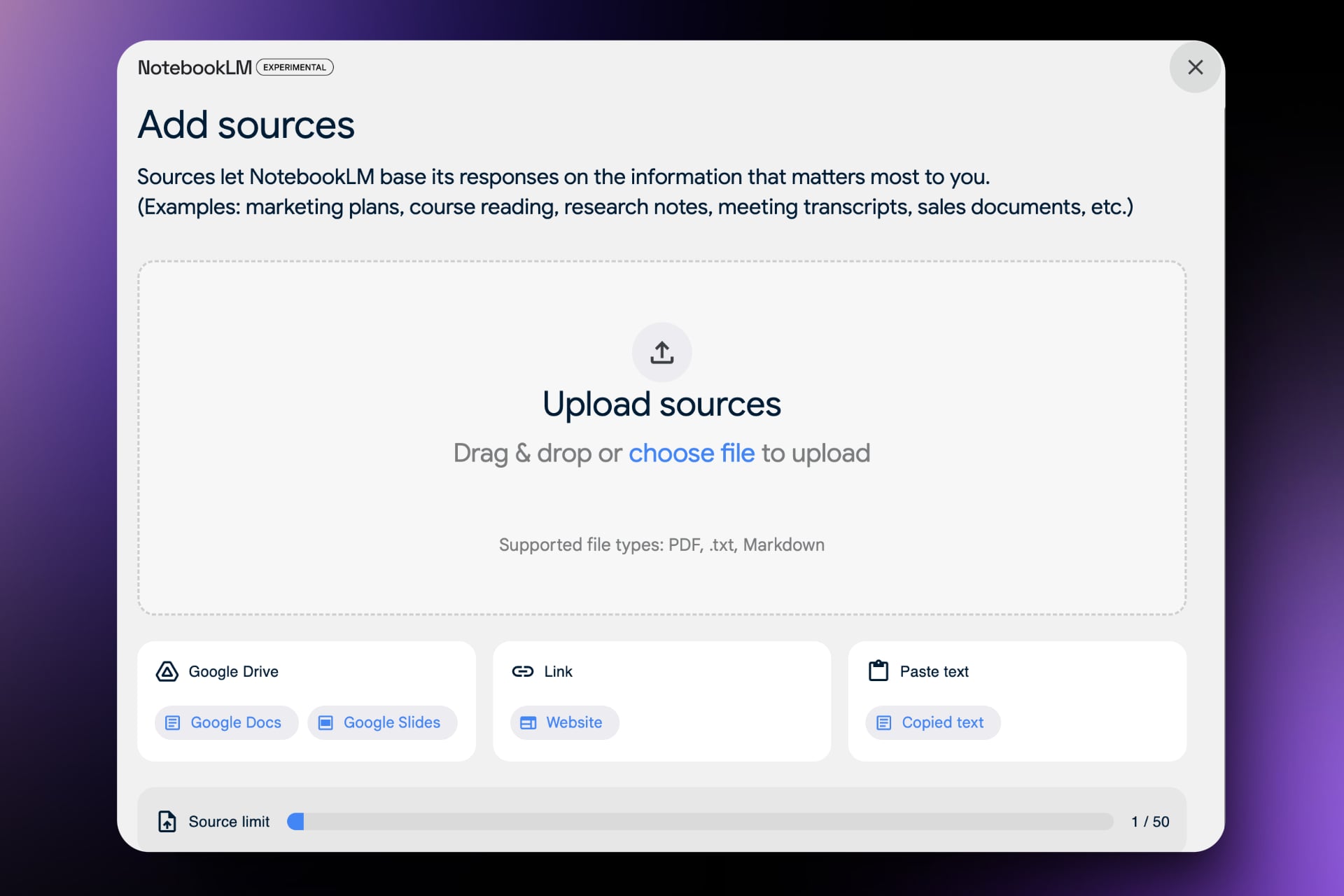
Step 1: Upload your documents
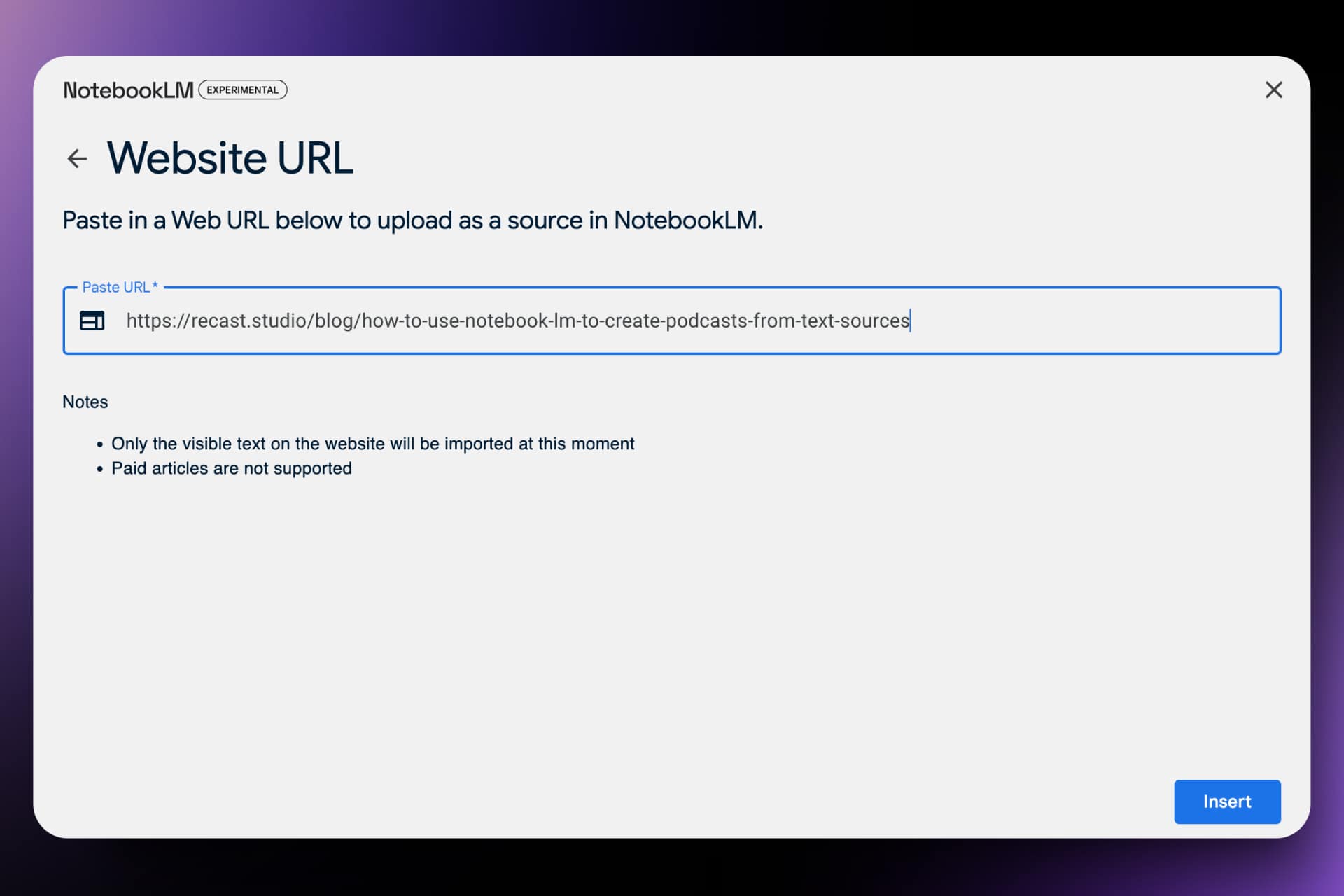
After signing in, create a new Notebook and add your sources. NotebookLM supports a wide range of input types:
- Files: PDF, .txt, Markdown, ePub, and local audio files such as MP3, WAV, M4A, and MP4
- Office files: DOCX, CSV, and PowerPoint
- Images: Common image formats such as PNG, JPG, WebP, HEIC, and TIFF
- Google Workspace: Google Docs, Google Slides, and Google Sheets
- Web content: Paste any URL to fetch the page content
- YouTube: Add YouTube video URLs (transcripts and subtitles are automatically extracted)
- Google Drive: Connect your Drive to pull sources directly
- Gemini chats: Add notebook chats from Gemini as context
Free users can add up to 50 sources in a single notebook. Each source can contain up to 500,000 words or up to 200MB for uploaded files. Paid Google AI plans raise those limits, so heavy research workflows can include many more sources.
Step 2: Generate your Audio Overview
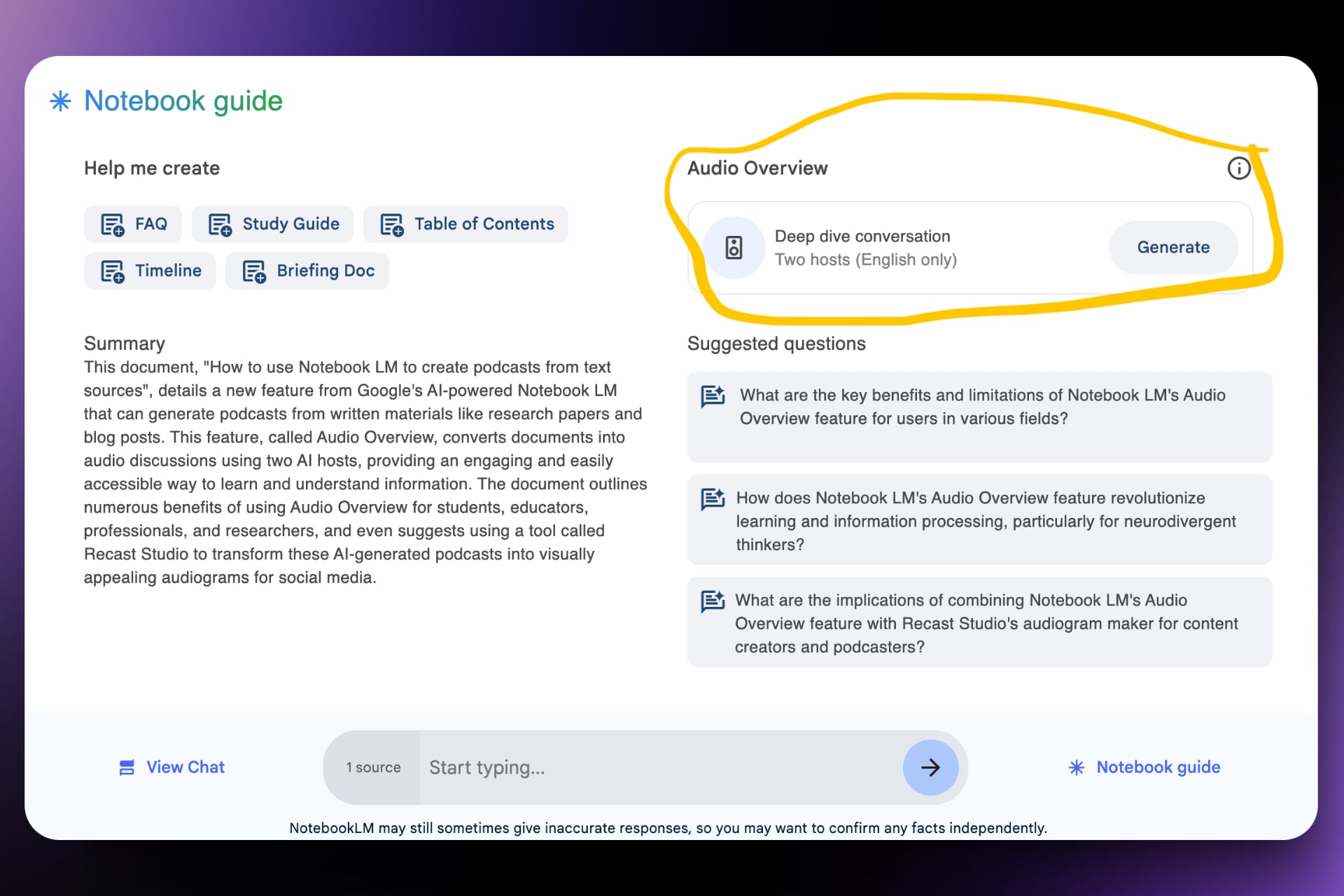
Once your sources are loaded, you’ll see the Audio Overview section in your Notebook. Here’s how to generate it:
- Find the Audio Overview option in the Studio panel.
- Choose your format: Deep Dive, Brief, Critique, or Debate.
- Optionally set your language, length, and prompt instructions.
- Click Generate and wait for the AI hosts to create your podcast.
Two AI hosts will analyze your content and create a natural-sounding conversation around it. Generation time depends on the amount of source material, but typically takes a few minutes.
Step 3: Download and listen
Once generated, you can:
- Listen directly in NotebookLM’s built-in player
- Download the audio file for offline listening or further editing
- Share a link to the Audio Overview when your account and sharing settings support it
- Join the conversation using Interactive Mode to ask questions in real time
- Keep working in NotebookLM while the audio plays in the background
- Access it on mobile via the NotebookLM iOS or Android app (with offline support)
The result is a polished audio file that sounds like a real podcast discussion — ready to listen, share, or repurpose.
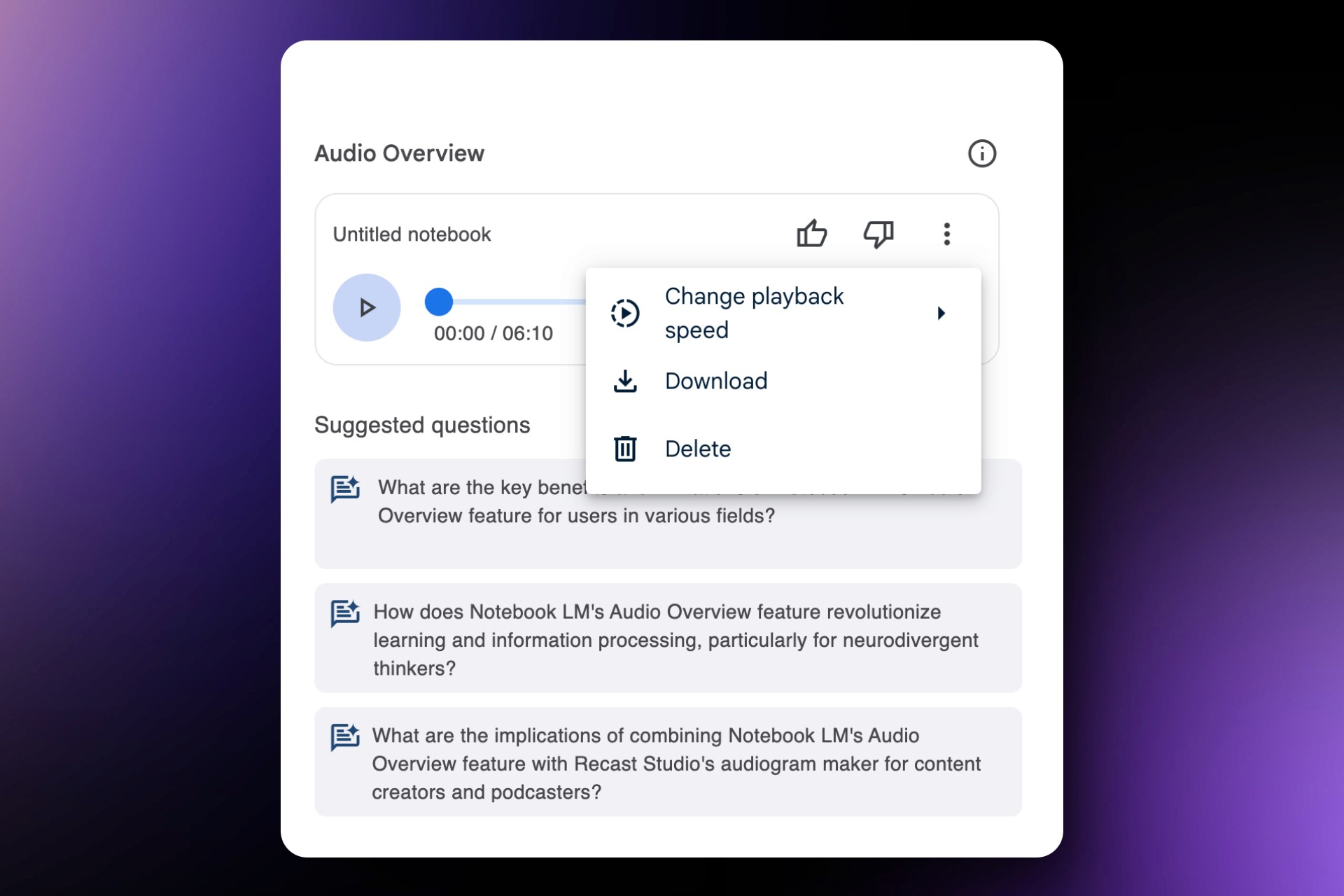
Here is an example podcast episode created using NotebookLM from the home page of Recast Studio:
Video Overviews: The Visual Alternative
In addition to Audio Overviews, NotebookLM now offers Video Overviews — a feature that transforms your source material into narrated visual walkthroughs using images, diagrams, quotes, and numbers from your sources.
Standard Video Overviews are now available in 80+ languages. Google has also introduced Cinematic Video Overviews, a more dynamic video format with richer visuals and animations. As of the latest rollout, Cinematic Video Overviews are available in English for Google AI Ultra subscribers aged 18+ on web and mobile.
These video outputs can be especially useful for:
- Creating educational content or explainer videos
- Building presentation materials from research
- Sharing visual summaries with teams or stakeholders
For podcast creators, Video Overviews are useful when you want a visual learning asset. Audio Overviews are still the better starting point when your goal is to create a podcast-style conversation that you can download and repurpose into clips or audiograms.
Enhancing Your NotebookLM Podcast with Recast Studio’s Audiogram Maker
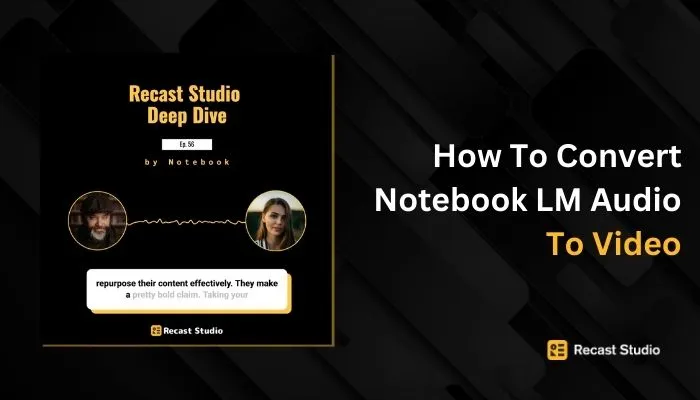
After creating your podcast using NotebookLM’s Audio Overview feature, you can take it a step further by converting it into an engaging audiogram using Recast Studio’s audiogram maker. This powerful tool transforms your audio content into visually appealing videos, perfect for sharing on social media and increasing your podcast’s reach.
Audiograms are short, animated videos that combine audio clips with visual elements such as waveforms, captions, and images. They offer several benefits:
- Increased engagement on social media platforms
- Improved accessibility for viewers who prefer visual content
- Enhanced discoverability through video-friendly algorithms
Recast Studio offers an AI-powered audiogram generator that simplifies the process of creating eye-catching audiograms. It’s designed to help podcasters leverage the power of video even for their audio content, boosting social engagement and increasing conversion rates.
Step-by-Step Guide to Creating an Audiogram
-
Upload Your NotebookLM Podcast:
- Download the Audio Overview file from NotebookLM
- Visit Recast Studio’s website and upload your audio file
- Choose the most impactful segment of your podcast for the audiogram
-
Select the Audiogram Style:
- Browse through Recast’s variety of templates
- Choose a style that aligns with your brand or podcast theme
-
Personalize Your Audiogram:
- Use Recast’s intuitive interface to customize your audiogram
- Adjust animations, colors, fonts, and images
- Fine-tune subtitles for accuracy and readability
Advantages of Using Audiograms for Podcast Promotion
- Visual Engagement: Audiograms transform your audio into visually appealing content, capturing more attention on social media platforms.
- Accessibility: They make your podcast content accessible to a wider audience, including those who prefer visual content.
- SEO Benefits: Audiograms can improve your content’s online visibility by providing text for search engines to index.
- Efficiency: Quickly create promotional content without compromising on quality.
Tips for Maximizing the Impact of Your Audiogram
- Keep it short: Aim for 30–60 seconds to maintain viewer interest
- Choose compelling quotes: Select the most intriguing or thought-provoking segments of your podcast
- Brand consistency: Ensure your audiogram design aligns with your podcast’s visual identity
- Optimize for different platforms: Create variations of your audiogram for various social media channels
- Include a call-to-action: Encourage viewers to listen to the full episode or subscribe to your podcast
By combining NotebookLM’s Audio Overview with Recast Studio’s audiogram maker, you can create a powerful promotional tool for your podcast. This combination lets you generate engaging audio content and present it in a visually appealing format that’s perfect for today’s social media-driven world.
Benefits for users
- Enhanced Learning: For many people, listening to a conversation is more engaging and memorable than reading text.
- Time-Saving: Instead of reading through long documents, you can listen to a summary while doing other tasks.
- Accessibility: This feature is particularly helpful for those with reading difficulties or visual impairments.
- Idea Generation: Hearing your content discussed can spark new ideas or perspectives you might not have considered.
- Portable Learning: Download the audio and take your learning on the go — perfect for commutes or workouts. The mobile app also supports offline listening.
Use Cases and Applications
NotebookLM’s Audio Overview feature offers a versatile tool that can benefit various user groups. Let’s explore some specific use cases and applications:
For Students and Educators
- Enhanced Learning Experience: Students can convert complex study materials into engaging audio discussions, making it easier to grasp difficult concepts. The conversational format helps in retaining information better, especially for auditory learners.
- Study Guide Creation: Quickly generate audio summaries of lecture notes, textbook chapters, or research papers. Use the Brief format for quick reviews or Deep Dive for thorough revision before exams.
- Accessibility: Provides an alternative learning method for students with reading difficulties or visual impairments. Allows for multitasking, enabling students to review materials while commuting or doing other activities.
- Lesson Planning: Teachers can use Audio Overview to create engaging audio content for flipped classroom models. The Critique format can help educators review their own teaching materials for improvements.
- Self-Assessment: Use the Debate format to explore multiple perspectives on a topic, or the Critique format to get AI feedback on essays and research papers before submission.
For Professionals and Researchers
- Efficient Document Analysis: Quickly digest long reports, research papers, or industry analyses. The Brief format provides fast summaries, while Deep Dive offers thorough exploration.
- Meeting Preparation: Generate audio summaries of important documents to review before meetings. Create briefing materials for team members in an easily consumable format.
- Continuous Learning: Stay updated on industry trends by converting articles and whitepapers into audio content for on-the-go learning via the mobile app.
- Research Synthesis: Combine multiple research sources and generate a comprehensive audio overview to identify patterns and connections. Use the Debate format to explore competing theories.
For Content Creators and Podcasters
- Content Ideation: Use Audio Overview to brainstorm ideas for new podcast episodes or content pieces. The Debate format can help explore different angles on a topic.
- Script Development: Convert research notes into conversational audio to help structure podcast scripts. Use the AI-generated dialogue as inspiration for natural-sounding content.
- Supplementary Content: Create audio summaries of blog posts or articles to offer as bonus content for listeners. The Brief format is perfect for quick audio teasers.
- Interview Preparation: Generate audio discussions based on an interviewee’s background or recent work to prepare for interviews.
Limitations and Considerations
While NotebookLM’s Audio Overview feature has improved significantly, it’s important to be aware of its current limitations and considerations.
Current Limitations
- Processing Time: For large notebooks with extensive source material, generating an Audio Overview can take several minutes. The Brief format is faster, but Deep Dive and Debate formats require more processing time.
- Interactive Mode Language: While audio generation now supports 80+ languages, the interactive “join the conversation” feature is currently available only in English.
- Source-Bound Content: The Audio Overview reflects only the information from the sources you’ve uploaded. It doesn’t pull in external knowledge beyond your provided materials.
- Free-Tier Limits: Free users currently get 100 notebooks, up to 50 sources per notebook, and daily limits that include 3 Audio Overview generations and 3 Video Overview generations. Paid Google AI plans raise notebook, source, chat, audio, video, and research limits.
- Workspace Sharing Rules: Public Audio Overview sharing is available for consumer accounts, but Workspace Enterprise and Education accounts may have stricter sharing limits.
Accuracy and Fact-Checking
- Potential for Inaccuracies: Google has warned that the AI hosts can “sometimes introduce inaccuracies” in their discussions. Always verify critical information against your original sources.
- Citation Verification: NotebookLM includes inline citations in text responses, making fact-checking easier. However, the audio format doesn’t provide the same level of source traceability — always cross-reference important claims.
- Context Sensitivity: The AI-generated conversations may not always capture the nuances or sensitivity of certain topics. The conversational “banter” style might not be appropriate for all types of content.
- Evolving Technology: NotebookLM is under active development. Current limitations may be addressed in future updates, and new capabilities continue to roll out regularly.
- Podcast Publishing Gap: NotebookLM can generate and download an Audio Overview, but it is not a full podcast hosting platform. It does not give you an editable script, recurring show management, RSS feed, or direct publishing workflow for Apple Podcasts, Spotify, or YouTube.
The Impact of NotebookLM on Learning and Information Processing
NotebookLM’s Audio Overview feature represents a significant leap forward in how we interact with and process information:
Benefits for Neurodivergent Thinkers
- Auditory Learning Support: For individuals with dyslexia or other reading difficulties, Audio Overview provides an alternative way to absorb information through natural conversation.
- Non-Linear Information Processing: The AI hosts make connections between different parts of the text and present them in a discussion format, which aligns well with non-linear thinking styles.
- Reduced Cognitive Load: The conversational format makes dense information more digestible, which is particularly beneficial for those who struggle with attention or information overload.
- Flexible Learning Styles: Users can switch between reading text, listening to audio, watching Video Overviews, or exploring mind maps — choosing whatever works best for them.
Enhancing Engagement and Comprehension
- Interactive Learning: With the ability to join the conversation and ask questions, learners can actively engage with their material rather than passively consuming it.
- Improved Retention: The conversational format taps into the power of storytelling and dialogue, which are known to improve information retention and recall.
- Multiple Perspectives: The Debate format specifically helps users understand different viewpoints, strengthening critical thinking skills.
- Multitasking Capability: The audio format and mobile app with offline support allow users to learn during commutes, workouts, or any other activity.
- Repetition Without Boredom: Users can listen to generated podcasts multiple times without the fatigue that comes with re-reading text, and can generate different formats (Brief, Deep Dive, Debate) from the same sources for varied experiences.
Conclusion
NotebookLM’s Audio Overview feature has matured from an experimental curiosity into a powerful, multilingual, interactive tool for transforming research material into engaging audio content. With four audio formats to choose from, the ability to join conversations interactively in English, support for 80+ output languages, and new Video Overview and research-output capabilities, it’s never been easier to turn your research, notes, or articles into podcast-style discussions.
Here’s a quick summary of what you can do today:
- Upload virtually any document type — PDFs, web URLs, YouTube videos, audio files, and Google Workspace documents.
- Choose from Deep Dive, Brief, Critique, or Debate formats to match your needs.
- Customize the format, language, English length setting, and prompt instructions before generating.
- Join the conversation interactively to ask questions in real time.
- Download the audio and repurpose it into social-ready video content using Recast Studio’s Audiogram Maker.
Whether you’re a student making sense of lecture notes, a professional digesting industry reports, or a content creator looking for fresh podcast material, NotebookLM gives you a powerful way to interact with information. Pair it with Recast Studio to turn those AI-generated discussions into shareable audiograms, video clips, and social content — and you’ve got a complete content workflow from document to distribution.