How to Repurpose Podcast Content: The Complete Guide (2026)
How to repurpose podcast episodes: a step-by-step workflow, formats for every channel, best practices, and tools to turn one episode into weeks of posts.
Repurposing content means turning one strong piece of work, such as a podcast episode, a webinar, or a long video, into several assets that each fit a different channel: short clips, audiograms, a blog post, show notes, a newsletter, and social posts. You do the hard work of recording once, then get weeks of publishing out of it.
This guide covers the whole process in one place:
- Why repurposing is worth the effort
- A step-by-step workflow you can run every week
- Which formats work on which channel (with a table)
- Specific ideas for podcast episodes and long videos
- Best practices, common mistakes, and what to measure
- Tools that speed up each step
Quick answer
To repurpose podcast content, start with one strong episode, transcribe it, pick the five to ten best moments, and turn them into short vertical clips with captions. Then use the same transcript to write show notes, a blog post, and a newsletter summary. Adapt each piece to its channel, schedule the posts over one to two weeks, and track which formats bring listeners back to the full episode.
What content repurposing is (and what it is not)
People often use three terms as if they mean the same thing. They don’t:
- Repurposing turns a source asset into a new format. A webinar becomes clips, show notes, and a blog summary.
- Cross-posting publishes the same asset on several platforms with few or no changes.
- Reposting publishes the same asset again later to reach people who missed it.
Cross-posting and reposting have their place, but repurposing creates the most value because each version is shaped for the platform and the audience that sees it. A 60-minute interview is a poor fit for TikTok. A 40-second clip of the best answer, with captions and a strong hook, is a good fit.
Why repurpose your content
You extend the life of your best work. Most episodes and videos get their attention in the first week and then fade. Repurposing gives the same ideas more chances to perform through clips, summaries, emails, and search-friendly pages.
You meet people in the format they prefer. Some people read, some watch, some listen. A blog post reaches readers, a clip reaches scrollers, and the full episode serves listeners. You reach more people without forcing everyone into one format.
You create more ways to be found in search. Audio is hard for search engines to index. Show notes, transcripts, and blog posts turn what you said into text that can rank for related queries and link back to the episode. This only helps when each page is useful on its own, not when it repeats the same thin summary.
You publish consistently without burning out. Most small teams don’t run out of ideas. They run out of time. Working from one anchor recording makes a steady publishing schedule realistic.
You get more return on the time you already spent. Research, guest booking, recording, and editing are the expensive parts. Repurposing spreads that cost across many outputs.
You give good ideas a second chance. A webinar with weak attendance can still produce strong clips. A long post that nobody finished might work better as a short video. Sometimes the idea was fine and the format was wrong.
You learn faster. Publishing the same idea as a clip, a carousel, and an article shows you which formats your audience actually responds to.
A step-by-step content repurposing workflow
This workflow works for podcasts, webinars, interviews, and long videos. Run it once end to end, then turn it into a weekly routine with clear owners.
Step 1: Set one goal for the batch
Decide what this batch of content should do before you edit anything. Grow the podcast audience? Drive sign-ups from a webinar? Rank for a topic? The goal decides which formats and channels to prioritize. Clips are good for reach, blog posts for search, and email for bringing people back.
Step 2: Pick a strong anchor asset
Not every recording is worth repurposing. Start with episodes or videos that already performed well, or that contain clear, specific advice, strong stories, or a memorable guest. If the source is weak, repurposing it into five formats gives you five weak assets.
Evergreen topics, such as tutorials, how-tos, and frameworks, are the best candidates because they stay useful for months.
Step 3: Write an asset map before you start
List the outputs you will make from this one source. A practical default:
- The full episode or video
- Three to five short clips (or up to ten for a long, dense recording)
- One audiogram for audio-only promotion
- Show notes with timestamps
- One long-form blog post
- One newsletter summary
- Three to seven text or image posts for social
- One clear call to action that points to the next step
Only plan what you can publish well and measure. A smaller set of good assets beats a large set of rushed ones.
Step 4: Transcribe the recording
The transcript is the raw material for almost every text asset, and it makes finding clip-worthy moments much faster. Use a podcast transcript generator to get a speaker-separated transcript, then skim it and mark the strongest quotes, stories, and answers. Our podcast transcript guide explains how to clean up and publish transcripts.
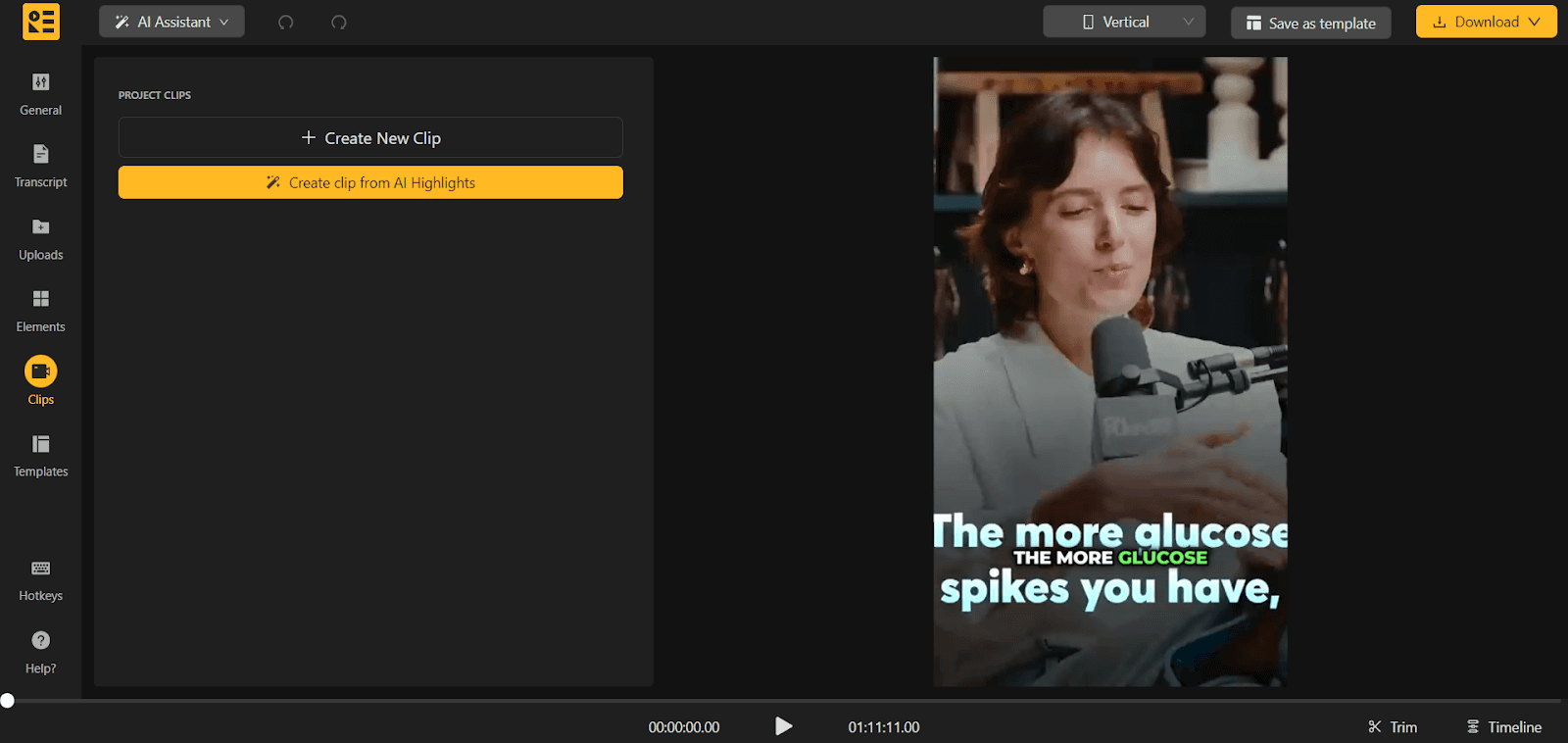
Step 5: Cut the best moments into clips
Look for moments that make sense without context: a sharp opinion, a surprising answer, a short story with a payoff, or a practical tip. Cut each one into a clip, reframe it to vertical (9:16) for Shorts, Reels, and TikTok, and add captions, since many people watch with the sound off.
A podcast clip maker can suggest highlights automatically, and an AI Shorts generator packages them as captioned vertical videos. For audio-only shows, turn your best moments into audiograms with the podcast audiogram generator.
Step 6: Create the written assets
Use the transcript to produce:
- Show notes: a short summary, key takeaways, timestamps, guest links, and resources mentioned. The podcast show notes generator gives you a structured first draft, and our guide on how to write podcast show notes has templates.
- A blog post: not a raw transcript, but a structured article with headings, context, and examples. The podcast to blog converter turns audio or transcripts into an SEO-ready draft you can then edit.
- A newsletter summary: the three most useful points and a link to the episode. See our podcast newsletter guide for formats that work.
- Social copy: quotes, short threads, and carousel text drawn from the strongest moments.
Step 7: Adapt each asset to its channel
Change the hook, length, and framing for each platform. A LinkedIn post needs a different first line than a TikTok caption. A blog post needs more explanation than a clip. If every version has the same copy and the same call to action, you are cross-posting, not repurposing.
Step 8: Schedule distribution over one to two weeks
Don’t publish everything on the same day. Spread clips across the week, send the newsletter when the blog post goes live, and save a few clips to promote the episode again later. Sequencing gives each asset room to perform and keeps the episode in front of people longer.
Step 9: Review results and improve the next batch
Once a week, check what earned reach, what earned clicks, and what converted. Use that to choose formats, hook styles, and clip lengths for the next episode. This feedback loop is what makes repurposing compound over time.
Repurposed content formats by channel
Use this table to match each output to the channel where it works best. Treat the lengths as starting points and adjust based on your own analytics.
| Channel | Best repurposed format | Typical length or shape | Main goal |
|---|---|---|---|
| YouTube | Full video episode plus Shorts | Full episode; Shorts in 9:16, under 60 seconds to start | Discovery and watch time |
| YouTube Shorts, Instagram Reels, TikTok | Captioned vertical clips | 20–45 seconds to start, 9:16 | Reach new audiences |
| Clips with captions, text posts, carousels | Short clips; posts with a strong first line | Authority and B2B reach | |
| Instagram feed and Stories | Quote graphics, carousels, audiograms | Square or 4:5 images; short audiograms | Engagement with existing followers |
| X (Twitter) and Threads | Quote posts, short threads, clips | A few short posts per episode | Conversation and reach |
| Blog or website | Blog post, show notes, transcript | Structured article with headings | Search traffic and depth |
| Email newsletter | Episode summary with key takeaways | Three to five points and one link | Bring people back |
| Podcast apps | Audio version of video or webinar content | Full episode | Serve audio-first listeners |
For platform specifics, see our guides to YouTube Shorts dimensions, podcast clips for TikTok, promoting podcast clips on Instagram Reels, and sharing your podcast on LinkedIn.
Ways to repurpose a podcast episode
1. Short video clips for social media
Clips are the highest-reach format for most shows. Pick moments that work on their own and put the hook in the first two or three seconds.
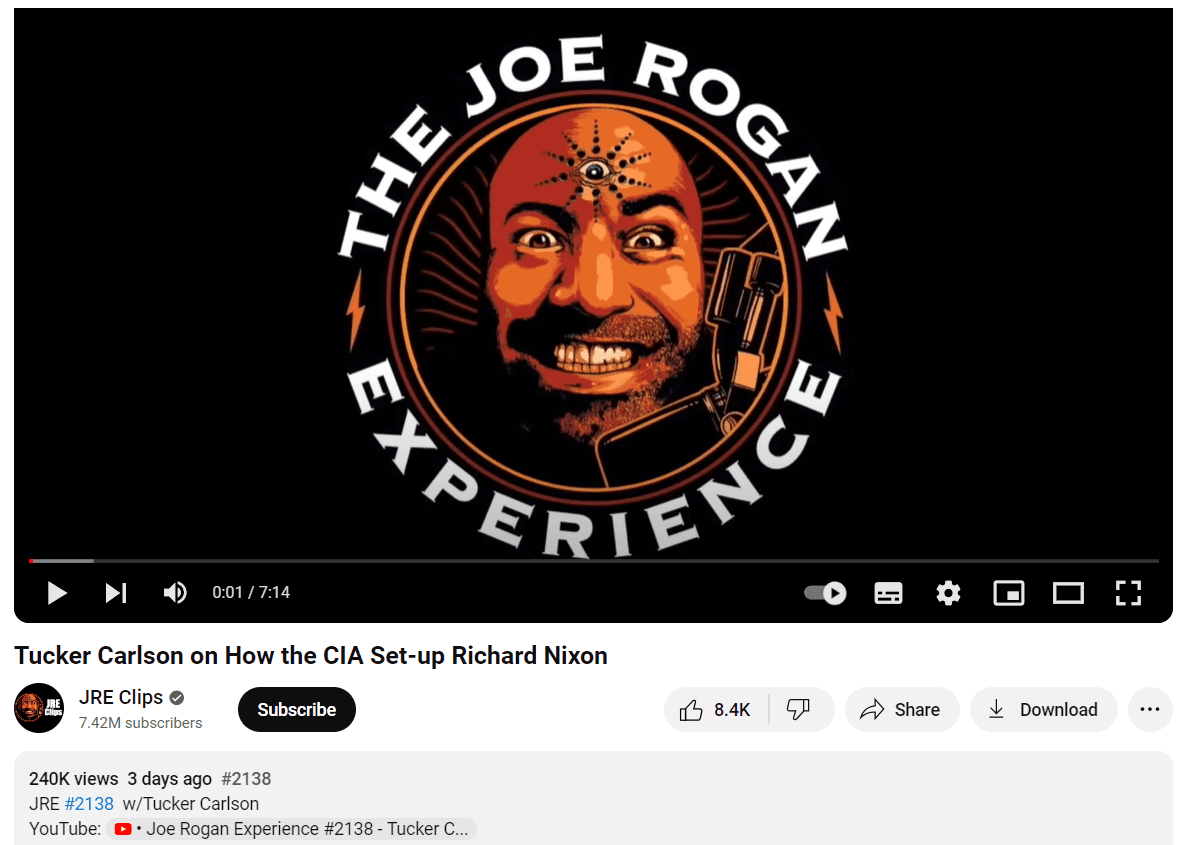
A well-known example is the Joe Rogan Experience, which runs a separate YouTube channel, JRE Clips, for short segments from full episodes. Clips like these introduce the show to people who would never start with a three-hour episode.
2. A full video version of the episode
If you record audio only, you can still publish on YouTube by adding visuals: a static image with a waveform, animated captions, or simple graphics. The podcast to video tool converts audio into a video with waveform animation, captions, and branding. If you are choosing a tool, compare options in best podcast to video tools.
3. Audiograms
Audiograms combine a short audio clip with a waveform, captions, and a background image. They are ideal for audio-only shows that want to promote episodes on visual platforms. See audiogram best practices for social media and ways to use audiograms beyond social.
4. A blog post
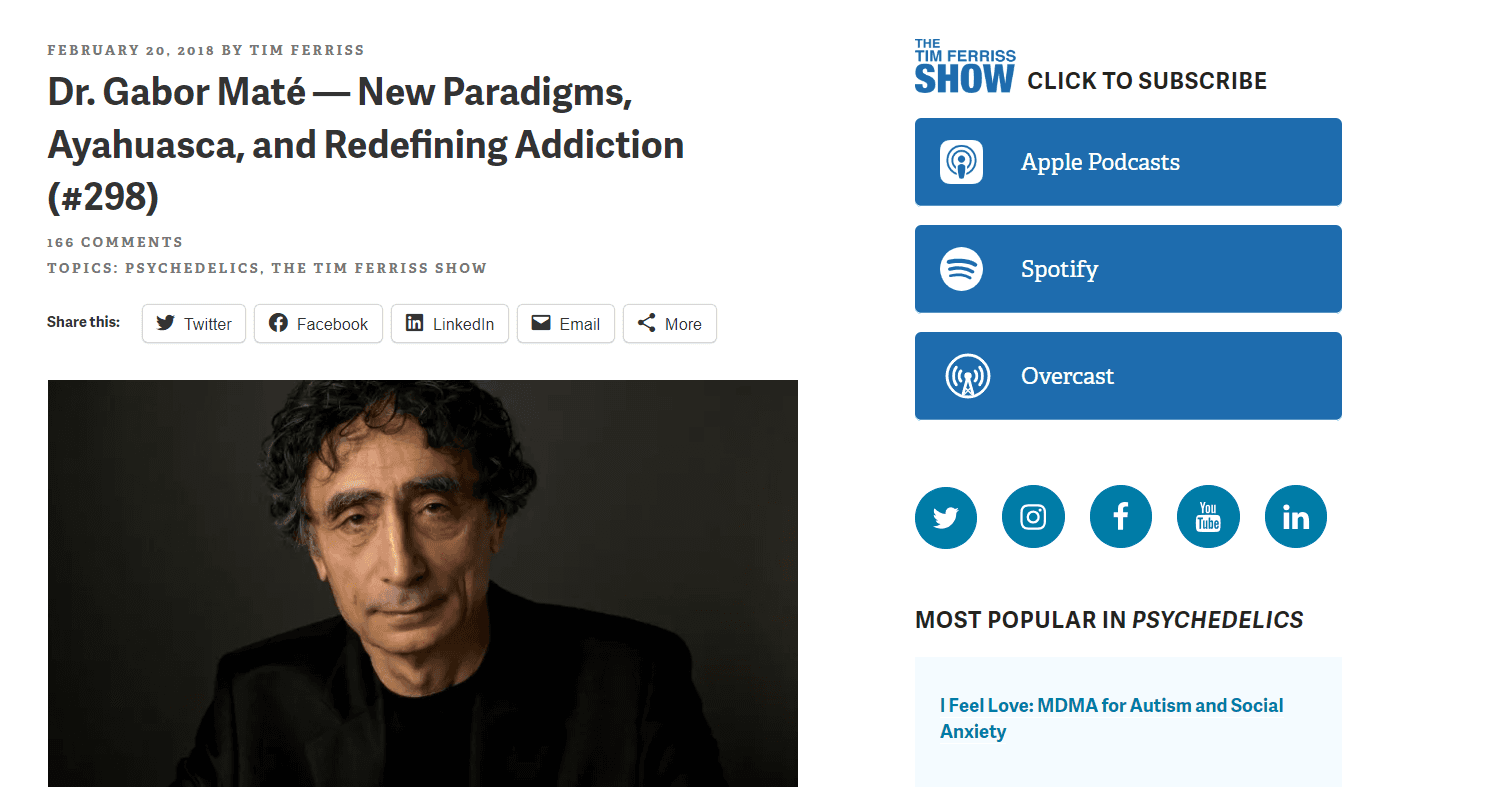
Turn the episode into an article that summarizes the key points or expands on one topic. Tim Ferriss does this on his blog: for example, his episode with Dr. Gabor Maté has a companion post that highlights the main points and links to the full conversation.
5. A published transcript
Transcripts make your episode accessible to people who are deaf or hard of hearing, help readers skim, and give search engines text to index. They are also the starting point for blog posts, guides, and quotes.
6. Show notes
Detailed show notes give context, help listeners find specific parts of the episode, and link to other episodes and resources. Good notes include a summary, takeaways, timestamps, and links. A podcast summary generator helps when you need a quick executive summary.
7. Quote graphics and carousels
Turn a strong quote or a short framework from the episode into an image or a multi-slide carousel for Instagram or LinkedIn. Keep each slide simple and make the series readable without the audio.
8. Newsletter content
Send subscribers the three most useful ideas from the episode with a link to listen. Email reaches people who don’t check social feeds and brings regular listeners back each week.
9. Live Q&A sessions
Use a popular episode as the topic of a live session on YouTube, LinkedIn, or Instagram. Answer follow-up questions, go deeper on one point, and record the session. The recording becomes new source material for the next batch.
10. Guides and e-books
If you have several episodes on one theme, combine their transcripts and blog posts into a downloadable guide. Offering it for free in exchange for an email address helps build your list.
How to repurpose video content
Long videos, such as tutorials, product demos, interviews, and YouTube episodes, follow the same workflow as podcasts. A few formats are especially useful for video:
- Micro-content: Break long videos into short clips that each make one point. A YouTube clip maker turns long YouTube content into captioned short clips.
- Teasers: Cut a short trailer that raises a problem and hints at the answer to promote the full video or an upcoming event.
- Audio versions: Extract the audio and publish it as a podcast episode, as long as the content still makes sense without visuals. Remove or explain parts that depend on what is on screen.
- How-to guides: Turn tutorial videos into step-by-step written guides with screenshots and embedded clips.
- Courses and training material: Split instructional videos into modules, add short quizzes or summaries, and use them for customer onboarding or internal training.
- Customer stories and case studies: Clip the strongest moments from customer interviews for your website, sales decks, and social proof, and expand measurable results into a written case study.
- Paid ad creative: Short clips that state a clear benefit or pain point in the first few seconds often make good ad tests.
- GIFs and email snippets: Short loops or thumbnails linking to the video can make newsletters more engaging.
If your clips need captions, see how to add open captions to your video. For ideas on video types that stay relevant, read the ultimate list of evergreen video formats.
How to repurpose webinar content
Webinars work well as source material because they are long, focused on one topic, and full of audience questions. The process is different from a podcast: you plan the assets before the event, mark moments during the session, and organize the outputs by funnel stage. See the full webinar repurposing playbook for the step-by-step workflow.
Best practices for repurposing content
- Start with one anchor asset. Build each batch around a single strong recording rather than creating disconnected pieces from scratch.
- Choose formats based on audience intent, not convenience. Use clips for discovery, carousels for quick education, blog posts for search and depth, and email for nurturing.
- Adapt the hook for every channel. The idea can stay the same; the first line, length, and framing should change.
- Don’t try to cover every channel. Focus on the two or three channels where your audience is active. A technical tutorial may do better on LinkedIn than on TikTok.
- Plan for repurposing while recording. Ask guests for short, quotable answers, and state key points clearly so they can stand alone as clips.
- Batch similar tasks. Cut all clips in one session and write all text assets in another.
- Keep branding consistent. Use the same fonts, colors, caption style, and templates so each asset is recognizably yours.
- Prioritize evergreen content. Tutorials, frameworks, and how-tos keep working for months and can be refreshed later.
- Optimize written assets for search. Use clear headings, the terms your audience searches for, and internal links to related episodes and pages.
- Keep a quality bar. Repurposing should save time, not lower standards.
Quality checklist before publishing
- The hook is clear in the first two or three seconds (or the first line of text).
- Captions are accurate and readable on a phone screen.
- The clip makes sense without the rest of the episode.
- Visual pacing matches the speaker’s rhythm.
- The call to action fits the channel and the stage of the funnel.
- Names, numbers, and claims are correct.
Common repurposing mistakes
- Repurposing weak source material instead of your strongest episodes.
- Publishing identical copy everywhere and calling it repurposing.
- Creating too many low-value assets from one source.
- Publishing all clips on the same day instead of spreading them out.
- Skipping a final check of captions, headlines, and design.
- Having nobody responsible for distribution, so assets get made but never published.
- Counting how much you published instead of what it achieved.
What to measure
Track a few metrics per format and compare them weekly:
- Short-form video: completion rate, average view duration, shares, and follows.
- Social posts: saves, comments, and click-through to the episode or landing page.
- Blog posts and show notes: organic traffic, time on page, and clicks to listen.
- Email: open rate and click-through to the episode.
- Business outcomes: new listeners or subscribers, sign-ups, and demo requests from repurposed assets.
Test at least two hook variants for important clips. Small changes to the first line or first frame often make the biggest difference.
Tools for repurposing content
You don’t need a large stack. Most teams need one main tool for their source format and maybe one specialist tool. For a side-by-side comparison of options, see our guide to the best content repurposing tools for long-form to short-form video.
If you start with recordings, these Recast Studio tools cover the workflow above:
| Task | Recast tool |
|---|---|
| Find highlights and cut clips | Podcast Clip Maker |
| Make captioned vertical Shorts, Reels, and TikToks | AI Shorts Generator |
| Turn audio into video with waveforms and captions | Podcast to Video |
| Make audiograms | Podcast Audiogram Generator |
| Get a transcript | Podcast Transcript Generator |
| Draft show notes | Podcast Show Notes Generator |
| Draft a blog post | Podcast to Blog Converter |
| Add subtitles | Podcast Subtitle Generator |
If your source is mostly written content, such as blog posts, PDFs, or notes, and you want an audio version, our sister product Jalp AI is built for text-first workflows. You can then repurpose that audio with the tools above.
Example: one episode, two weeks of content
Here is what a single 60-minute interview can become:
| Day | Asset | Channel |
|---|---|---|
| Day 1 | Full episode, show notes, and transcript | Podcast apps, YouTube, website |
| Day 1 | Newsletter summary | |
| Day 2 | Clip 1 (strongest hook) | Shorts, Reels, TikTok, LinkedIn |
| Day 3 | Quote carousel | LinkedIn, Instagram |
| Day 4 | Clip 2 | Shorts, Reels, TikTok |
| Day 5 | Blog post based on the episode | Website |
| Day 7 | Audiogram | Instagram Stories, X |
| Days 8–14 | Clips 3–5 and text posts | Rotated across channels |
FAQ
How do you repurpose a podcast?
Transcribe the episode, choose the strongest moments, and turn them into short captioned clips and audiograms. Then use the transcript to write show notes, a blog post, and a newsletter summary. Adapt each asset to its channel and publish them over one to two weeks.
How do you repurpose podcast content for social media?
Cut short clips that make sense without context, reframe them to vertical, add captions, and put the hook in the first few seconds. Support the clips with quote graphics, carousels, and short text posts drawn from the same episode.
How many pieces of content can you get from one episode?
It depends on the episode’s length and quality, but a typical set is three to ten clips, one audiogram, show notes, a blog post, a newsletter, and several social posts. Make only what you can publish well and measure.
How long should repurposed clips be?
Start in the 20–45 second range for Shorts, Reels, and TikTok, then adjust based on completion rates in your analytics.
Is repurposing content good for SEO?
Yes, when the repurposed assets are useful on their own. Show notes, transcripts, and blog posts give search engines text to index and create more pages that can rank. Thin pages that repeat the same summary help much less.
Do I need perfect audio to repurpose content?
No, but clear speech and accurate captions matter. Poor audio is the most common reason clips don’t hold attention.
What is the best tool for repurposing podcast content?
It depends on your starting format and the outputs you need. If you start with recordings and want clips, captions, show notes, and blog drafts from one place, Recast Studio covers that workflow. Compare alternatives in our content repurposing tools guide.
Next step
Pick your strongest recent episode or webinar and run the workflow once from start to finish. Then turn it into a weekly routine with clear owners, a fixed asset map, and a short weekly review. To speed up clipping, captioning, and written drafts, start repurposing in Recast Studio.